01. 局所性Locality of behavior
機能単位で構成Feature-shaped APIs
1つの静的クラスが1つのエンドポイント。リクエスト、レスポンス、ハンドラー、バリデーションを同じ場所で確認できます。One static class maps to one endpoint. Request, response, handler, and validation stay close together.
機能ファイルから API 契約を生成する .NET API フレームワーク。Generate API contracts from feature files.
Minimal API の書き味はそのまま。1つの機能定義から登録、診断、型付きクライアントを生成します。 Keep Minimal APIs. Generate registration, checks, and typed clients from one feature definition.
dotnet run --project samples/SliceFx.Sample
using System.ComponentModel.DataAnnotations;
using SliceFx.Sample.Services;

namespace SliceFx.Sample.Features.Users;

[Feature("POST /users", Summary = "Create a new user")]
public static class CreateUser
{
    public record Request(
        [Required, MinLength(2)] string Name,
        [Required, EmailAddress] string Email);

    public record Response(Guid Id, string Name, string Email, DateTime CreatedAt);

    public static async Task<Response> Handle(Request req, IUserStore store, CancellationToken ct)
    {
        var user = await store.AddAsync(req.Name, req.Email, ct);
        return new Response(user.Id, user.Name, user.Email, user.CreatedAt);
    }
}
リリース状況: 0.x preview が NuGet で公開中 (2026-06-01)。Release status: a 0.x preview is available on NuGet (2026-06-01).
pre-1.0 の実験的ソフトウェアです。API は安定版リリース前に変更される可能性があります。Maintainer dogfooding は稼働中: slicefx-inbox(Fermyon Cloud)。Pre-1.0 experimental software. APIs may change before a stable release. Maintainer dogfooding is live: slicefx-inbox (on Fermyon Cloud).
ルート、DTO、バリデーション、クライアント、移植性チェックを別々に管理せず、1つの機能ファイルからつなげます。Keep routes, DTOs, validation, clients, and portability checks connected to one feature file.
01. 局所性Locality of behavior
1つの静的クラスが1つのエンドポイント。リクエスト、レスポンス、ハンドラー、バリデーションを同じ場所で確認できます。One static class maps to one endpoint. Request, response, handler, and validation stay close together.
02. 契約の生成Contract generation
ルートメタデータ、互換性レポート、型付きクライアント、OpenAPI projection を同じ機能ファイルから生成します。The same feature files generate route metadata, compatibility reports, typed clients, and OpenAPI projections.
# 同じマニフェストから型付きクライアントを生成Typed clients from the same manifest
slicefx client csharp --output SliceApiClient.g.cs
slicefx client typescript --output slice-api-client.ts
03. 土台Foundation
Minimal API のバインディング、DI、エンドポイントフィルター、DataAnnotations をそのまま利用できます。必要な場面では ASP.NET 固有の IResult も使えます。Keep Minimal API binding, DI, endpoint filters, and DataAnnotations. Use ASP.NET-specific IResult when a slice needs it.
SliceFx は ASP.NET の機能を制限しません。認可・レート制限・キャッシュ・CORS・カスタム検証はそのまま使えます。ASP.NET 機能とエスケープハッチ → SliceFx doesn't restrict any ASP.NET feature. Authorization, rate limiting, caching, CORS, and custom validation all stay available. ASP.NET features and escape hatches →
SliceFx は ASP.NET Core の上に乗ります。実行時は Minimal API に近く、ずれやすい登録・診断・クライアント生成だけを機能ファイルから補います。SliceFx sits on ASP.NET Core. Runtime behavior stays close to Minimal APIs. The generator handles the registration, checks, and clients that tend to drift.
SLICE001 などのビルド時診断を同じメタデータでつなぎます。slicefx routes、slicefx client csharp、slicefx openapi もこのメタデータを読みます。One set of metadata connects feature locality and build-time diagnostics such as SLICE001. slicefx routes, slicefx client csharp, and slicefx openapi read the same metadata.API 層は軽く保ちたい。でもルート、クライアント、将来の実行環境をばらばらに管理したくない。そんな個人やチームに向いています。For individual developers and teams that want a light API layer without letting routes, clients, and future runtime choices drift apart.
slicefx routes で移植性を早めに確認しながら、普段は ASP.NET Core を主な実行環境として使い続けられます。slicefx routes surfaces portability early while ASP.NET Core remains the primary runtime.コアランタイムが依存するのは Microsoft.AspNetCore.App だけです。FluentValidation や MediatR を前提にせず、必要なアダプタだけを後から追加できます。The core runtime only depends on Microsoft.AspNetCore.App. FluentValidation and MediatR are not required. Optional adapters can be added later.
AddSlice() と MapSlices() はソースジェネレータが出力します。登録経路を1つに絞り、無効な機能定義は SLICE### 診断としてビルド時に出します。The source generator emits AddSlice() and MapSlices(). Invalid feature shapes become SLICE### diagnostics at build time.
生成コードは標準の MapMethods 呼び出しに展開され、起動時のルートスキャンを避けます。SliceFx.Core は NuGet 依存を増やさず、trimming/AOT 向けの小さな土台を保ちます。Generated code expands to standard MapMethods calls and avoids startup route scanning. SliceFx.Core avoids extra NuGet dependencies to keep the base small for trimming and Native AOT.
AWS Lambda、wasi:http、TestHost へのアダプタはサテライトパッケージです。普段は ASP.NET Core で使いながら、移植できる機能を slicefx routes で確認できます。Lambda, wasi:http, and TestHost support live in satellite packages. Use ASP.NET Core day to day while slicefx routes shows which features remain portable.
ルートマニフェストは 4 つの CLI コマンドが共有します。slicefx routes、slicefx client csharp、slicefx client typescript、slicefx openapi です。Four CLI commands share the route manifest: slicefx routes, slicefx client csharp, slicefx client typescript, and slicefx openapi.
ジェネレータが出力するのは標準の MapMethods 呼び出しです。ジェネレータ参照を外して生成コードをその場に展開すれば、フレームワーク由来のコードをほとんど残さずに離脱できます。The generator emits standard MapMethods calls. Remove the source generator reference and expand the generated output in place. Almost no framework-specific code is left behind.
生成コードは純粋な Minimal API 展開です。[Authorize]、認証・認可ポリシー、出力キャッシュ、レート制限、CORS、OpenAPI、標準バインディングはすべて使い続けられます。ASP.NET 機能とエスケープハッチ →Generated code is pure Minimal API expansion. [Authorize], auth policies, output caching, rate limiting, CORS, OpenAPI, and standard binding all stay available. ASP.NET features and escape hatches →
[Feature("METHOD /path")] でルートを宣言[Feature("METHOD /path")] declarative routing[Filter<T>] でエンドポイントフィルターを適用[Filter<T>] endpoint filtersISliceValidator<T> で検証DataAnnotations and ISliceValidator<T>リクエスト、レスポンス、ハンドラー、バリデーション、フィルターまで、機能に関わるコードを1つのファイルにまとめられます。Request, response, handler, validation, and filters in one feature file.
using System.ComponentModel.DataAnnotations;
using SliceFx.Sample.Services;

namespace SliceFx.Sample.Features.Users;

[Feature("POST /users", Summary = "Create a new user")]
public static class CreateUser
{
    public record Request(
        [Required, MinLength(2)] string Name,
        [Required, EmailAddress] string Email);

    public record Response(Guid Id, string Name, string Email, DateTime CreatedAt);

    public static async Task<Response> Handle(Request req, IUserStore store, CancellationToken ct)
    {
        var user = await store.AddAsync(req.Name, req.Email, ct);
        return new Response(user.Id, user.Name, user.Email, user.CreatedAt);
    }
}
using SliceFx.Sample.Services;

var builder = WebApplication.CreateSlimBuilder(args);

builder.Services.AddSlice();
builder.Services.AddOpenApi();
builder.Services.AddSingleton(TimeProvider.System);
builder.Services.AddSingleton<IUserStore, InMemoryUserStore>();
builder.Services.AddSingleton<AuditLog>();
builder.Services.AddKeyedSingleton<IClock, SystemClock>("promotion");
// Factory-lambda registration avoids ActivatorUtilities reflection — AOT-safe under full-trim NativeAOT.
// UserAuthFilter populates this per-request; GetCurrentUser injects it directly.
builder.Services.AddScoped(_ => new CurrentUser());

var app = builder.Build();

app.MapSlices(); // <-- Registers all features automatically
if (app.Environment.IsDevelopment())
{
    app.MapOpenApi();
}

app.Run();
slicefx routes
slicefx routes --format json
slicefx client csharp --output SliceApiClient.g.cs
slicefx client typescript --output slice-api-client.ts
slicefx openapi --output openapi.json
ポータビリティのヒント: [FromServices]Portability tip: [FromServices]
ASP.NET パスのバインディングは生の Minimal API と同じです。登録済みサービスは、具象クラスとインターフェイスのどちらも、[FromServices] なしで DI から解決されます。WASI / Lambda にも移植したい場合は、バインド元を明示してください。具象クラスのサービスに [FromServices]、キー付きサービスに [FromKeyedServices(key)] を付けます。パラメータバインディングの詳細 →On the ASP.NET path, binding is plain Minimal API: any registered service, concrete or interface, resolves from DI automatically. To keep handlers portable across WASI and Lambda, annotate concrete services with [FromServices] and keyed services with [FromKeyedServices(key)]. On those paths the generator uses a compile-time heuristic. Parameter binding details →
SliceFx の既定は普通の ASP.NET Core アプリです。WASI / edge は、同じ機能ファイルを将来 ASP.NET 以外にも持っていけるかを確認するための実験的な選択肢です。SliceFx defaults to a normal ASP.NET Core app. WASI / edge support is an experimental way to see whether the same feature files can move beyond ASP.NET later.
edge は、利用者に近い場所でコードを動かす考え方です。WASI は、サーバー側コードを WebAssembly component として動かす仕組みです。SliceFx.Wasi は生成されたルートテーブルを使い、ASP.NET の外でも portable な機能を dispatch します。Edge means running code closer to users. WASI packages server-side code as a WebAssembly component. SliceFx.Wasi uses a generated route table to dispatch portable features outside ASP.NET.
ほとんどのプロジェクトは 3 つの移植性クラスを同じコードベースで併用します。分類はツールに「どこで動かせるか」を伝えるもので、コードの良し悪しを表すものではありません。Most projects use all three portability classes in the same codebase. The classification tells tooling where a feature can run, not whether it is well-written.
プレーンな request / response を返す機能。型付きクライアント、WASI dispatch、function-per-feature Lambda の候補になります。Plain request / response features. Candidates for typed clients, WASI dispatch, and function-per-feature Lambda.
ハンドラー形状は移植できますが、一部のフィルターなど、付随する振る舞いは ASP.NET 固有です。The handler shape is portable, but some attached behavior such as endpoint filters is ASP.NET-specific today.
IResult など ASP.NET 固有の仕組みを意図的に使う機能です。悪いコードではなく、ASP.NET に残すという判断です。Features that intentionally use ASP.NET concepts such as IResult. Not bad code, just an ASP.NET-specific choice.
ホスティングやテストに必要な依存関係は、用途ごとのサテライトパッケージに分けています。すべてのパッケージは NuGet で公開されています。Hosting and testing dependencies stay in satellite packages. All packages are available on NuGet.
属性、バリデーションフィルター、エンドポイントフィルターを含むコアランタイムです。Core runtime: attributes, validation filters, and endpoint filters.
機能ルートの登録コードを、AOT に適した形で生成します。AOT-friendly generated registrations for feature routes.
ASP.NET Core 上で AWS Lambda ホスティングを使うための連携パッケージです。AWS Lambda hosting integration over ASP.NET Core.
Cloudflare Workers や Fermyon Spin などの wasi:http ホスト向けに、ASP.NET に依存しない実験的なディスパッチを提供します。Experimental ASP.NET-independent dispatch for wasi:http hosts such as Cloudflare Workers and Fermyon Spin.
SliceFx アプリをインプロセスで HTTP テストするためのヘルパーです。In-process HTTP testing helpers for SliceFx apps.
slicefx コマンドで、スキャフォールディング、ルート確認、互換性レポート、型付きクライアント生成、OpenAPI projection を実行できます。Scaffolding, route inspection, compatibility reports, typed client generation, and OpenAPI projections through the slicefx command.
SliceFx がどんな原則で動いていて、実運用に向けてどの基準をまだ満たす必要があるかをまとめたドキュメント群です。How SliceFx is built, what invariants it defends, and which production-readiness criteria it still needs to meet.
01
なぜ IMediator を入れないか、なぜ CreateSlimBuilder か、なぜインクリメンタル生成か。よく聞かれる設計判断をまとめています。Why no IMediator, why CreateSlimBuilder, why an incremental generator. Frequently asked design questions, answered.
GitHub で読むRead on GitHub
02
SLICE 診断(機能定義、移植性、検証、移行時の重複をカバー)、ルートマニフェストのスキーマ、インクリメンタルキャッシュの仕組み。SLICE diagnostics (feature shape, portability, validation, migration overlap), the route manifest schema, and the incremental cache shape.
GitHub で読むRead on GitHub
03
既存の Minimal API や MVC コントローラーから、1エンドポイントずつ機能ファイルへ移す PoC 手順。Endpoint-by-endpoint PoC paths from existing Minimal APIs or MVC controllers into feature files.
04
SliceFx では何が使えるか。認可・レート制限・CORS・キャッシュ・検証の拡張パス、そして ASP.NET / WASI / Lambda 間でハンドラをポータブルに保つためのバインディング規則。What you keep: authorization, rate limiting, CORS, caching, and custom validation with ISliceValidator<T>. Also how binding rules differ between ASP.NET (plain Minimal API) and portable targets (WASI / Lambda).
GitHub で読むRead on GitHub
05
[assembly: SliceAspNetAot] を付けると、AOT-safe な生成モードに切り替わります。JIT なしで数 ms で起動するネイティブバイナリを発行し、distroless コンテナに収める手順です。Opt in with [assembly: SliceAspNetAot] for reflection-free generated dispatch. Publish a native binary with no JIT and a millisecond cold start, then drop it in a distroless container image.
GitHub で読むRead on GitHub
06
達成済みの主張ではなく、目標です。強みを保つための 6 つのインバリアント、ベンチマーク基準値、perf ゲート、採用マトリクスをまとめています。Targets, not a completed claim: the invariants that preserve SliceFx's strengths, benchmark baselines, perf gates, and the adoption matrix.
GitHub で読むRead on GitHub
07
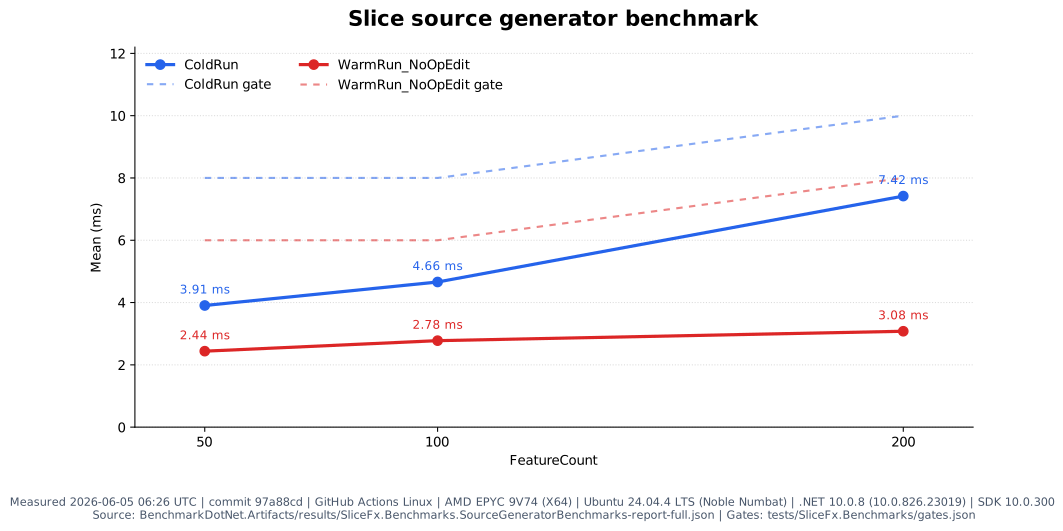
ソースジェネレータの ColdRun / WarmRun_NoOpEdit を計測した SVG チャート。毎晩の GitHub Actions perf 実行から生成します。An SVG chart of source-generator ColdRun and WarmRun_NoOpEdit timings, generated from the nightly GitHub Actions perf run.
SVG を開くOpen SVG
GitHub ドキュメント: CLI コマンド ・ OpenAPI ・ ASP.NET 機能 ・ Native AOT ・ Lambda ホスティング ・ 移行ガイド ・ プロダクト方針 GitHub docs: CLI commands · OpenAPI · ASP.NET features · Native AOT · Lambda hosting · Migration guides · Product direction